Keep Green separate from Dark Green, and Blue separate from Navy Blue, when ordering these knee-length pants. Save the full colour label with one size value so a shortened note cannot point to two different options.
Which colour names can be confused?
| Related labels | How to record them |
|---|---|
| Green / Dark Green | Keep the word “Dark” when that is the selected value. |
| Blue / Navy Blue | Keep the word “Navy” when that is the selected value. |
| Pink / Black / Khaki / White | Use the complete label as displayed. |
Do not rename a colour from the screen image. Display settings can change its appearance, while the exact selector text remains part of the order record.
How should size be added?
The current Size menu lists M, L, XL, 2XL, 3XL, 4XL and 5XL. Add one exact size label after the full colour name, such as “Navy Blue / 2XL.” These are option labels, not measurements or a fit guarantee. Use only the current chart or store guidance if measurements are required.
What can the black product photo confirm?
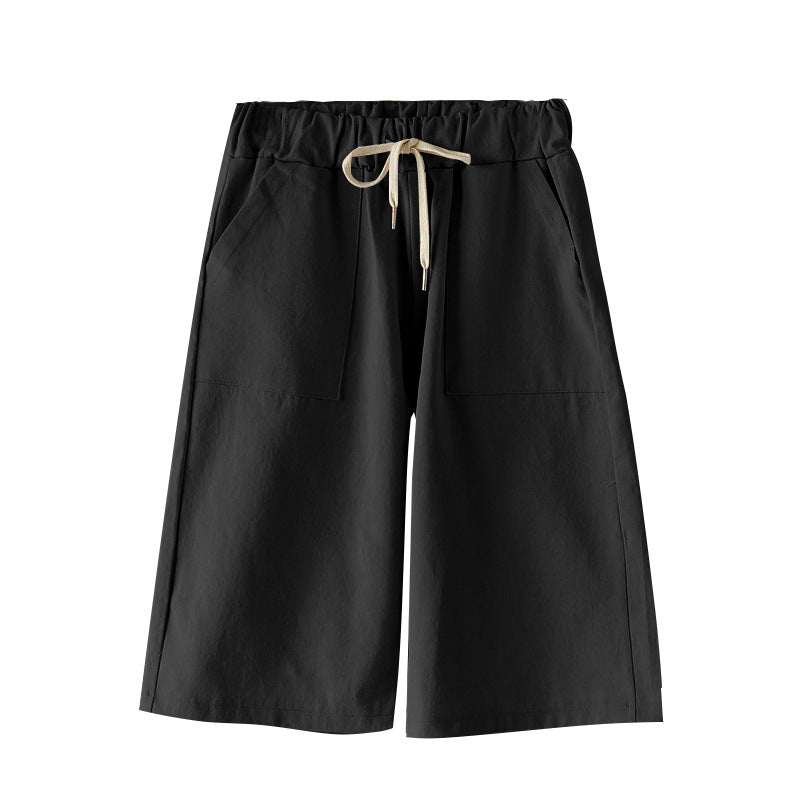
The current image shows a black knee-length, wide-leg garment with a light-coloured drawstring and two large front pockets. It supports those visible details for the photographed presentation only. It does not establish material, stretch, comfort, fit, stability or care.
Common label questions
Does the black photo show the Green, Dark Green, Blue or Navy Blue options? No. It documents the Black presentation only. Use the current variant image for another colour and retain its full selector name.
Should 2XL be rewritten as XXL? No. The current menu says 2XL, followed by 3XL, 4XL and 5XL. Copy the listed form so the order note matches the cart.
Compare the saved colour-size pair with the cart line, then revisit the current Loose Waist and Loose Knee Length Pants listing before checkout.